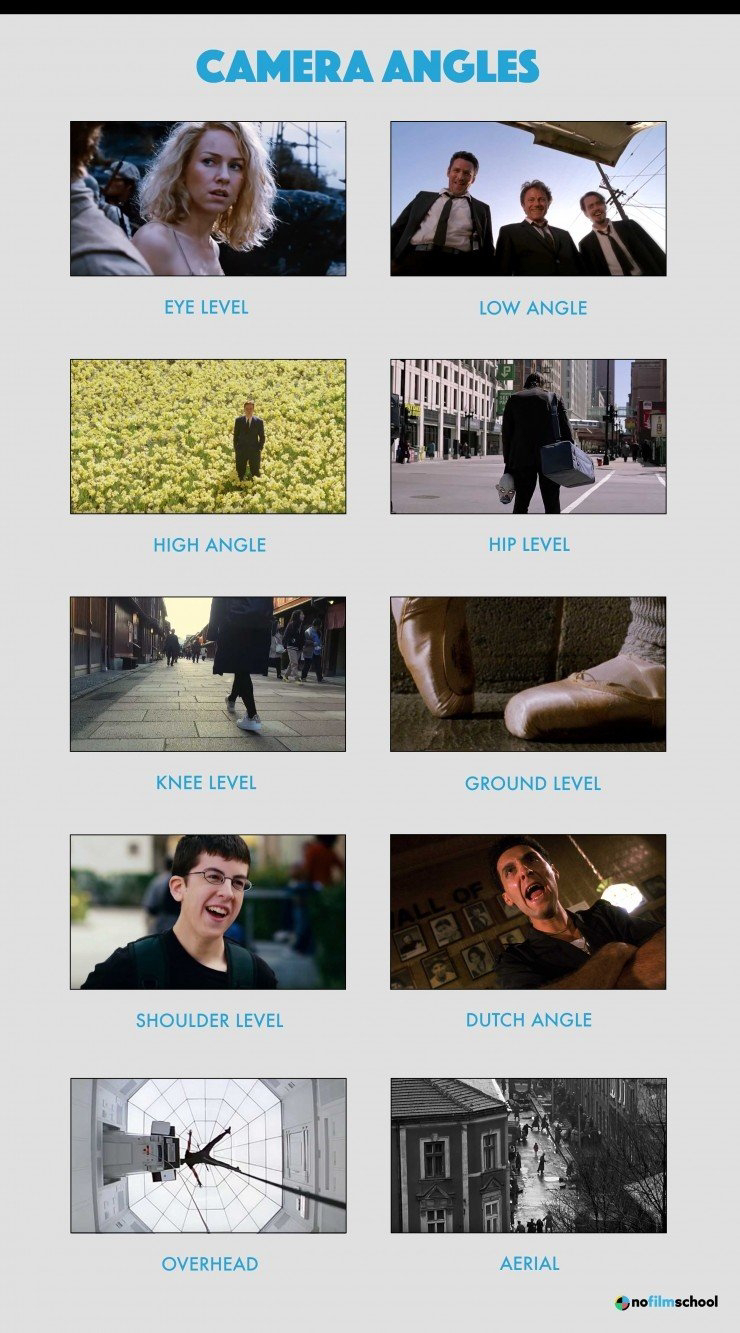
At this point she is halfway done editing. I feel like she is almost done though. I think she's really focused on the transitions and making the video look good. She's also focusing on how she can highlight the different angles being used. When I edited another video previously it was hard to add the audio. Hopefully she didn't have any trouble adding the audio because she didn't mention it. I don't know if iMovie has watermarks. The one I use last time did have watermarks and I was trying to find another one that didn't. Then she mentions that she had to cut some parts off to make the video shorter. We did take a lot of takes while filming so I understand. Some of the clips were longer than anticipated. Because of that she had to chop some of those scenes up. I offered to edit but she said she would. I don't think I did too bad on the last project we had with editing. She has an iPhone so the quality is way better than my phone. That's why we used her p...
So, the props that I'm going to use are paper, a desk, chair, and a classroom. Technically the classroom will be the setting. The main prop will probably be the paper mate gel pen. The costumes are going to be casual wear like you're in a classroom or at home. For example, maybe jeans, tights, a T shirt, or some shorts. Since this is a pen commercial it wouldn't be that much going into the costume. So, the schedule is I'm going to start filming next week Monday in the classroom and figure out angles. Also, I could possibly ask someone to help me record it since I am not in a group. with that help I can get great angles and use different types of them instead of sticking with one. then on Friday I will complete one of my blogs of filming and put some input. I may use some people outside of school to help me film. I think there might be a 50% chance that I will have a backup plan. I think that because this commercial seems so simple and it is required to have different ...
My name is Withly and this is my intro blog. I am in the AS level and this is my first year taking a class that has to do with filming. I usually don't take classes like these, but I wanted to try something new this year. I'm a sophomore and graduating in 2024 and hopefully getting the AICE diploma. I was born on January 16, 2006 and for my age, I think I’m very mature. I wasn't born in America but was born in Haiti. I really enjoy performing arts so I feel like this correlates in some way. Some examples of performing arts are singing and dancing. my favorite colors right now are green and pink because i feel like they're pretty colors and they compliment my skin. I feel like this commercial project will be interesting. I think that because I will able to show a lot of my skills and creativity and to also learn new things. Some ideas that popped up in my head was some hygienic brands. These brands can be soap, deodorant, lotion, and more. I fell like I can present these...
.png)



Comments
Post a Comment